Society guideline recommendations, extracted
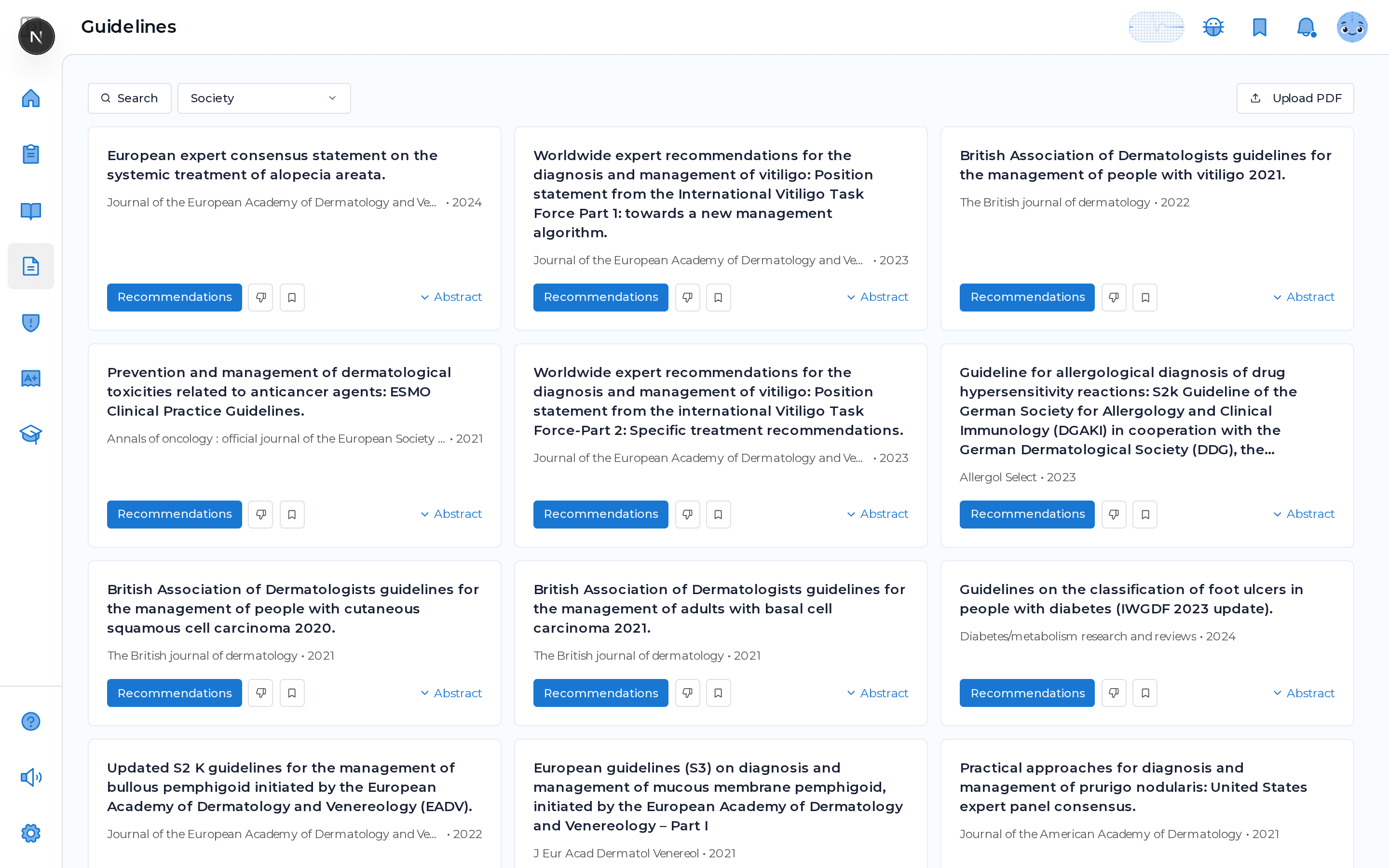
MDProgress surfaces clinical practice guidelines relevant to your specialty and the societies you care about, then pulls the recommendations out of long source documents into scannable structured rows. You read the part that changes what you do at the bedside, with the evidence class and a link back to the source kept right next to each line, so checking what the guideline actually says stops meaning scrolling forty pages of PDF.
Why it helps
Keeping up stops being a project
Skip to the recommendations
A guideline can run dozens of pages before it tells you what to do. MDProgress extracts the recommendation rows so the part that guides care is the first thing you see.
Matched to how you practice
Guidelines are filtered to your specialty, and the app suggests the societies relevant to your field, so the list reflects your work instead of every guideline ever published.
Keep the evidence in view
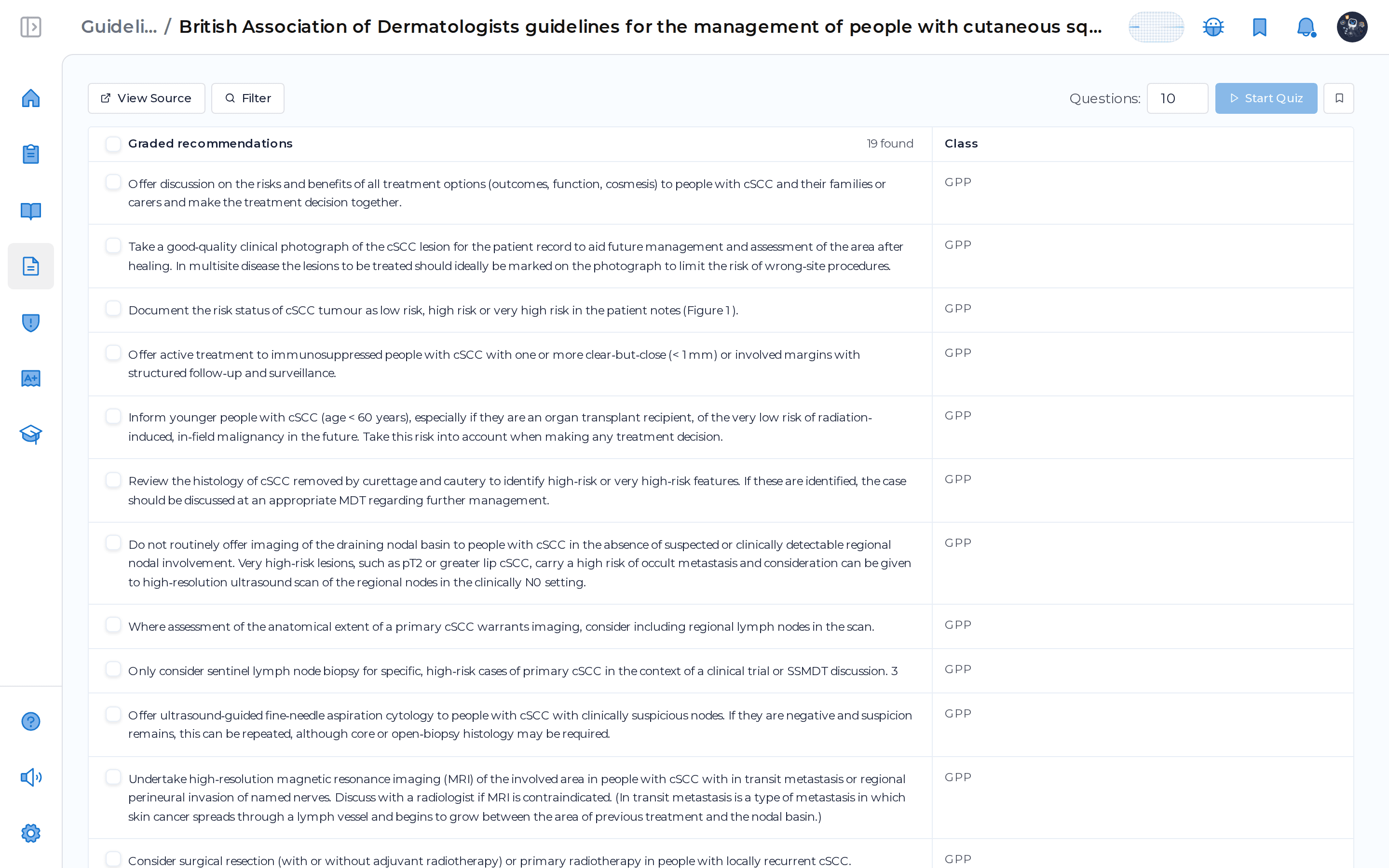
Where the source assigns one, each recommendation carries its evidence class or strength in a Class column, and ungraded recommendations are listed separately so the graded ones read clean.
Turn a read into recall
Quiz yourself on the recommendations you just scanned and the CME records itself, so reviewing a guideline becomes study you remember rather than a page you skimmed.
What it does
Everything in one place
Recommendations, extracted
Long guideline documents become scannable rows, one recommendation per line, with the source context preserved.
Evidence class kept
Each row shows its evidence category or recommendation strength in a Class column wherever the source provides one.
Save and reopen the source
Bookmark any guideline for later and open the original document straight from the card.
Bring your own PDF
Upload a guideline PDF you already have and MDProgress extracts its recommendations the same way.
The recommendation table, line by line
Open a guideline and its recommendations load as a structured table, one row each, with a Class column carrying the evidence category or recommendation strength the source assigned. Recommendations that came with a formal grade sit together so they read cleanly, and any that arrived ungraded are listed in their own table below rather than padded with blanks. Select the rows you want, set how many questions you would like, and quiz yourself on exactly those recommendations, with a link back to the source kept beside the text the whole way through.
Frequently asked questions
Where do the recommendations come from?
MDProgress reads the source guideline document and extracts its recommendations into rows, keeping the surrounding context and, where the source provides one, the evidence class or recommendation strength. The original document stays one click away so you can always check a row against the source.
How are guidelines matched to me?
Guidelines are filtered to your specialty, and the app suggests the societies relevant to your field so the list reflects the guidance you actually follow. You can browse by society and bookmark the ones you want to keep close.
Can I add a guideline that is not in the library?
Yes. Press Request and MDProgress fetches the guideline, extracts its recommendations, and notifies you when it is ready. If you already hold the PDF, upload it directly and it is extracted the same way.
Do I earn CME from guidelines?
When you quiz yourself on a guideline's recommendations and answer the questions, the activity is recorded toward your CME record automatically. MDProgress is not an accredited provider yet, and the Activity Report is built to support reporting where your licensing or certification body permits it.
See it in your own specialty
Set up your specialty and scope in a couple of minutes and MDProgress starts fitting the way you practice. Your first month is free, with no payment today.