Know the risks in your practice
MDProgress builds a personalized profile of the medicolegal and clinical practice risks that apply to your work, drawn from your specialty, your scope of practice, and your jurisdiction. Each risk is specific to how you actually practice and grounded in a real source you can open, so risk awareness stops being a wall of generic warnings.
Why it helps
Keeping up stops being a project
Specific to how you practice
The profile reflects your specialty, your scope of practice, and your province or state, so the risks you read are the ones that actually touch your work.
Grounded, not generic
Every risk carries an explanatory note and, where one exists, a source you can open. You see where the concern comes from instead of a vague caution.
Two ways to look at it
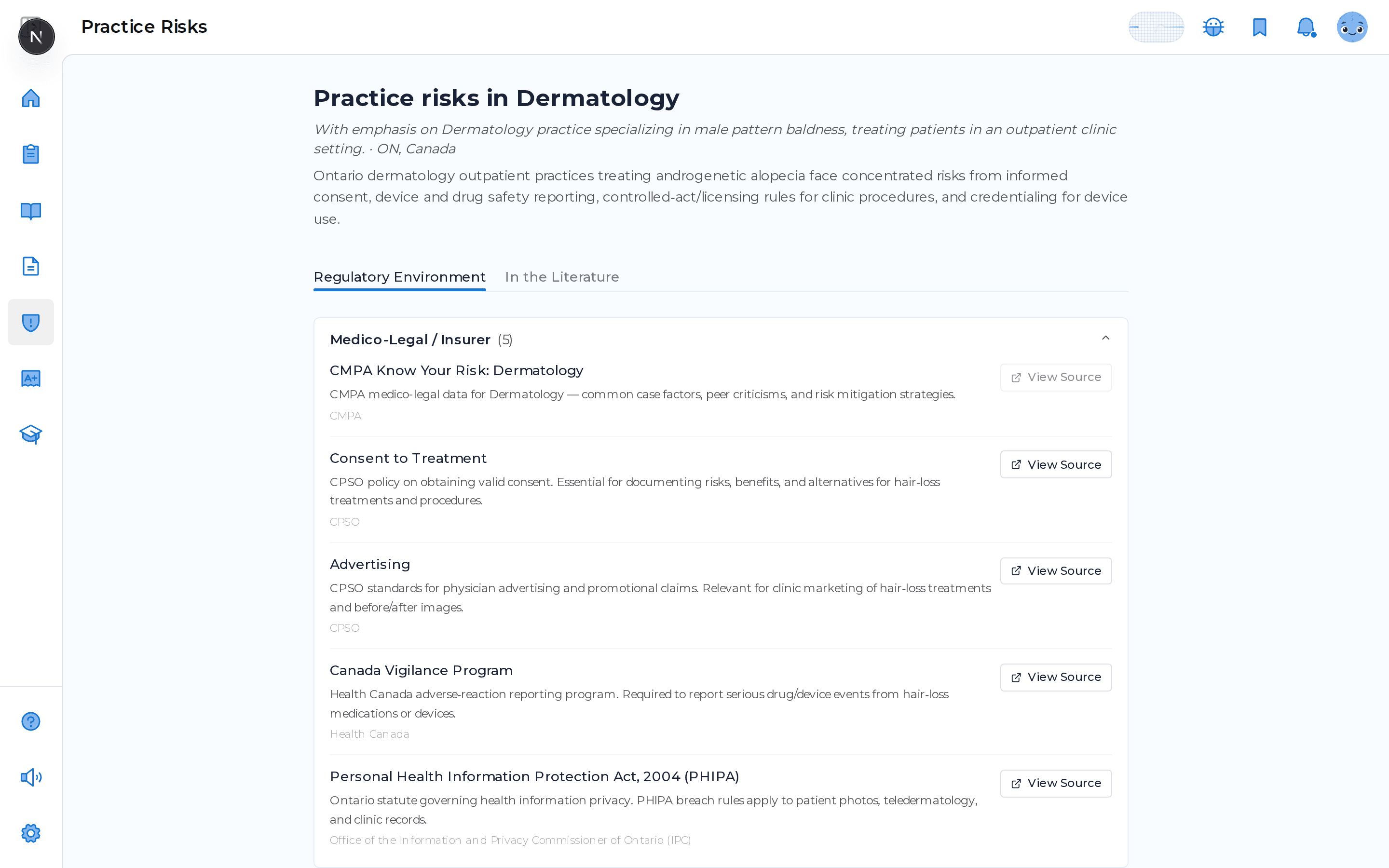
A Regulatory Environment view organizes risks by area like licensure, credentialing, and medicolegal exposure, and an In the Literature view attaches relevant articles to each one.
Stays current with you
Update your specialty, scope, or jurisdiction and MDProgress regenerates the profile in the background, so it keeps pace as your practice changes.
What it does
Everything in one place
Built from your profile
Your specialty, scope of practice, and jurisdiction shape the risks that appear.
View Source on each risk
Open the document a risk is grounded in, so you can read the original rather than take our word for it.
Literature for every risk
Each risk area comes with relevant journal articles you can open, save, and quiz yourself on.
Organized by area
Risks are grouped into clear categories like medicolegal, licensure, and credentialing so the profile is easy to scan.
Every risk points back to a real source
A risk you cannot verify is just a worry. So each risk in your profile carries a short explanatory note and, wherever one exists, a View Source link that opens the document behind it. You can read the regulation, policy, or position statement for yourself, and the In the Literature view attaches relevant journal articles to each risk area so you can go deeper, save what matters, and turn any of it into a quick quiz.
Frequently asked questions
How is my risk profile built?
MDProgress uses your specialty, your scope of practice, and your jurisdiction to generate a profile of the medicolegal and practice risks relevant to your work. Each risk is organized by area and comes with an explanatory note.
Where do the risks come from?
Risks are grounded in real sources wherever possible. When a source exists you will see a View Source link on the risk that opens the original document, so you can read it directly.
What is the In the Literature view?
Alongside the Regulatory Environment view, MDProgress attaches relevant journal articles to your risk areas. You can open these articles, save them to your library, and quiz yourself on them like any other reading.
What happens when my practice changes?
When you update your specialty, scope, or jurisdiction in your settings, MDProgress regenerates your profile in the background and keeps your current risks on screen until the new set is ready.
See it in your own specialty
Set up your specialty and scope in a couple of minutes and MDProgress starts fitting the way you practice. Your first month is free, with no payment today.