Look up any clinical topic
MDProgress turns any clinical question into a useful set of articles in one step. Give it a topic, paste a case or your notes, or add an image, and it either lays out a structured reading path of focused subtopics or runs a direct article search. Each subtopic opens to a curated set of journal articles you can read, save, or quiz yourself on, so you move from "I should read about this" to actually reading it.
Why it helps
Keeping up stops being a project
Start from how you think
A topic, a case description, your shorthand notes, or a photo all work as a starting point. You describe the question the way it actually came up, and the reading follows.
A reading path, not a wall of results
Instead of one long list, a broad topic opens into focused subtopics, each with its own curated article set. You read in a sensible order rather than guessing where to begin.
Skip straight to the source when you know it
When you already know exactly what you want, direct search drops the subtopics and returns articles for your query right away. The structured path is there when you want it, not in the way when you do not.
Read, save, and prove it in one place
Articles open with the same browsing and saved-article tools as the rest of MDProgress, so anything worth keeping lands in your library and anything worth studying can become a quiz that counts.
What it does
Everything in one place
Subtopics on demand
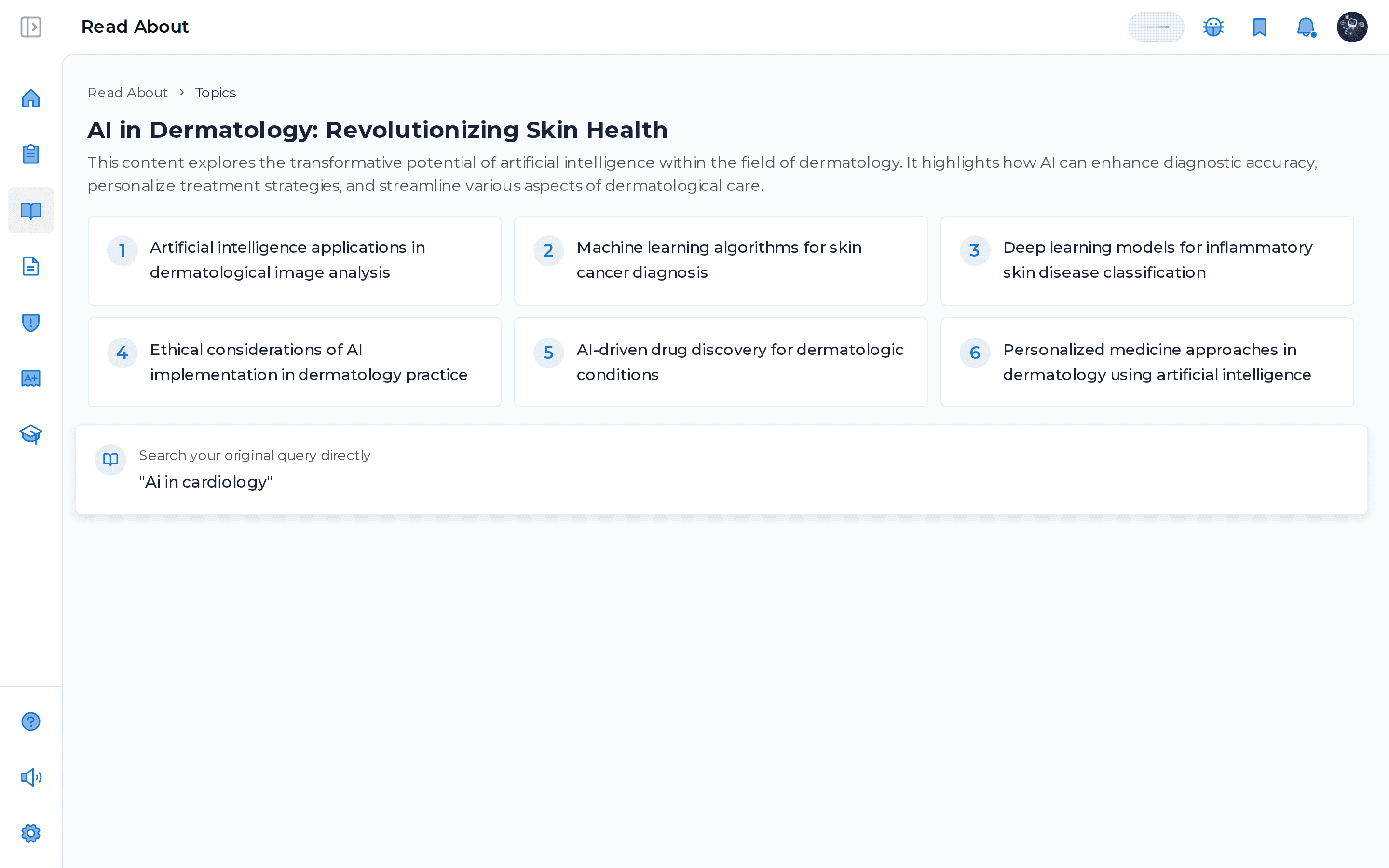
A broad question expands into focused, numbered subtopics, each a curated reading set you can open one at a time.
Topic, case, notes, or image
Type a topic, paste a case or notes, dictate by voice, or add an image. The input meets you where the question started.
Direct search when you want it
Switch to direct search and get articles for your exact query immediately, no subtopics in between.
Familiar reading and saving
Open, read, and save articles with the same patterns you already use everywhere else in MDProgress.
From a question to a reading path
A real clinical question is rarely one search. When you describe a topic or drop in a case, MDProgress breaks it into focused subtopics, and each one opens to its own curated set of journal articles, so you read in order instead of starting from a blank search box. Your original query stays one tap away as a direct search whenever you want to go straight to the source.
Frequently asked questions
What can I give it to start?
A topic, a case description, your notes, or an image. You can type, dictate by voice, or upload an image, and you can switch between building a reading path of subtopics and running a direct article search.
What is the difference between explore topics and direct search?
Explore topics breaks your question into focused subtopics and gives each one its own curated article set, which is useful when you want a structured path through a broad area. Direct search skips the subtopics and returns articles for your exact query right away.
Where do the articles come from?
From the same journal article corpus the rest of MDProgress draws on, and they open with the same browsing and saved-article tools, so anything worth keeping goes straight to your library.
Can I earn CME from what I look up?
Yes. Articles you find here can become a short quiz like anywhere else in MDProgress, and answering the questions records the activity toward your CME record. MDProgress is not an accredited provider yet, and the Activity Report is built to support reporting where your licensing or certification body permits it.
See it in your own specialty
Set up your specialty and scope in a couple of minutes and MDProgress starts fitting the way you practice. Your first month is free, with no payment today.